> ## Documentation Index
> Fetch the complete documentation index at: https://docs.ecomelixir.com/llms.txt
> Use this file to discover all available pages before exploring further.

# Welcome to Elixir

> The premium Shopify theme built for conversion

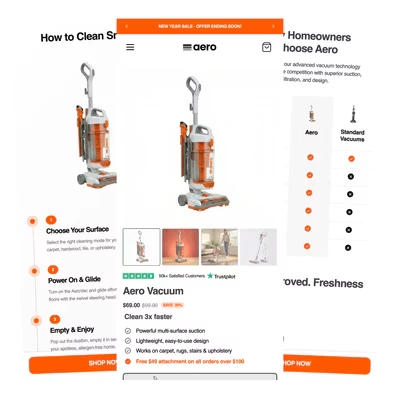
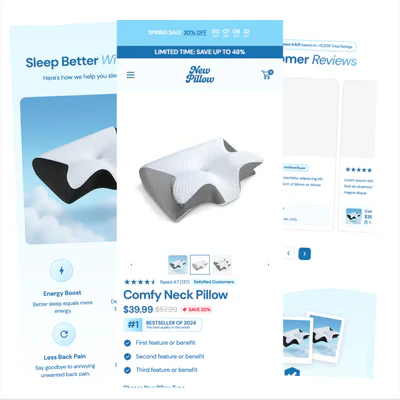
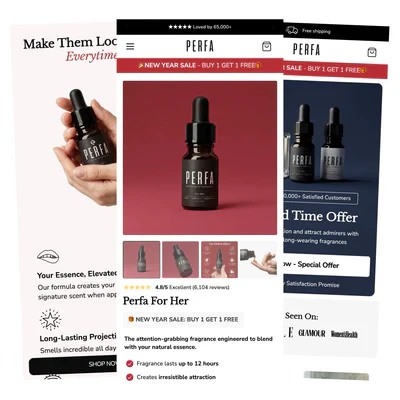
Elixir is a premium Shopify theme designed to help you build high-converting storefronts, no code or developers needed. Everything is customizable directly from the Shopify theme editor.

<CardGroup cols={3}>
  <Card title="60+ Sections" icon="layer-group">
    Hero banners, reviews, comparisons, testimonials, countdowns, and more.
  </Card>

  <Card title="120+ Blocks" icon="cube">
    Quantity breaks, trust badges, ratings, countdown timers, and more.
  </Card>

  <Card title="6+ Templates" icon="file">
    Ready-made product page designs you can install in one click.
  </Card>
</CardGroup>

> Recommended setup time: 20–30 minutes
>
> New to Elixir? Follow the guides below in order for the smoothest setup experience.

## Get started

<Steps>
  <Step title="Install the theme">
    Upload Elixir to your Shopify store and activate your license key.

    [Installation guide →](/installation)
  </Step>

  <Step title="Customize your brand">
    Set up your colors, fonts, and button styles to match your brand.

    [Branding guide →](/guides/branding)
  </Step>

  <Step title="Set up your header">
    Configure your logo, navigation, announcement bar, and sticky header.

    [Header guide →](/guides/header)
  </Step>

  <Step title="Build your homepage">
    Add sections to create a high-converting homepage.

    [Homepage guide →](/guides/homepage)
  </Step>

  <Step title="Build your product page">
    Configure your product page with the right blocks, offers, and social proof.

    [Product page guide →](/guides/product-page)
  </Step>

  <Step title="Set up your cart">
    Add upsells, discount codes, free gift thresholds, and urgency timers to your cart.

    [Cart guide →](/guides/cart)
  </Step>
</Steps>

## See Elixir in action

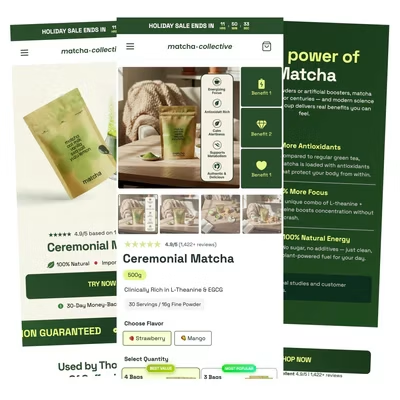
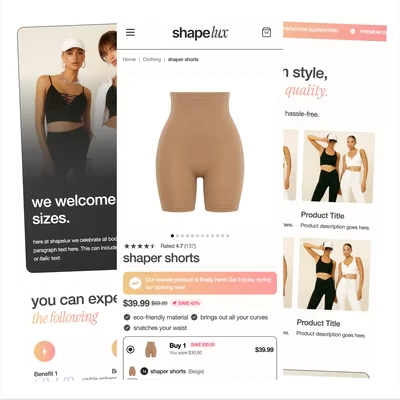
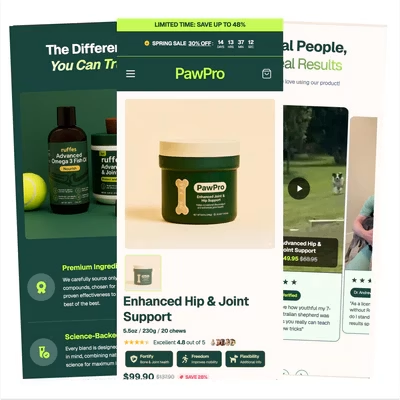
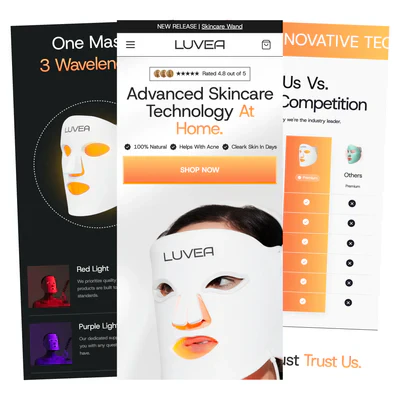
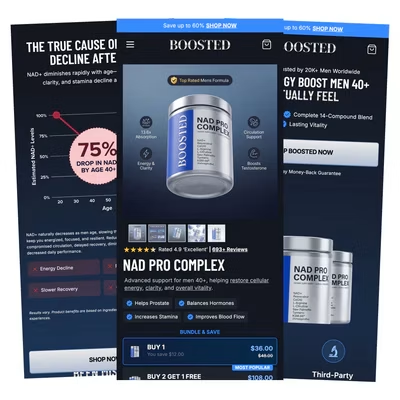
Explore stores built with Elixir across different industries and product categories. Use these examples for inspiration when designing your own store.
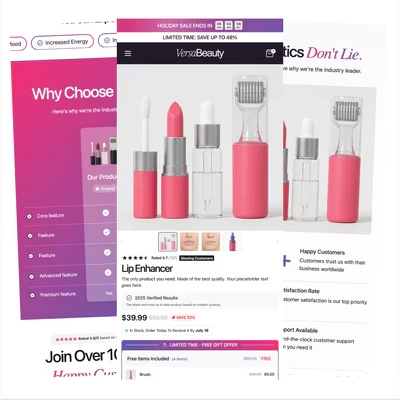
<CardGroup cols={3}>
  <Card title="Beauty" href="https://versabeauty1.myshopify.com/products/test-product">
    <Frame>
      <img src="https://mintcdn.com/elixir-fb942e33/u8zsEa-ZeNwln-Jx/images/demos/versa.webp?fit=max&auto=format&n=u8zsEa-ZeNwln-Jx&q=85&s=d1315344cecfe4116f6803161d1475c4" alt="VersaBeauty demo" width="400" height="400" data-path="images/demos/versa.webp" />
    </Frame>
  </Card>

  <Card title="Supplements" href="https://issr0h-tg.myshopify.com/">
    <Frame>
      <img src="https://mintcdn.com/elixir-fb942e33/u8zsEa-ZeNwln-Jx/images/demos/BOOSTED.webp?fit=max&auto=format&n=u8zsEa-ZeNwln-Jx&q=85&s=ae9db58b1cd729eee573c2b3814d963a" alt="Boosted demo" width="400" height="400" data-path="images/demos/BOOSTED.webp" />
    </Frame>
  </Card>

  <Card title="Matcha" href="https://h0nttj-4r.myshopify.com/">
    <Frame>
      <img src="https://mintcdn.com/elixir-fb942e33/u8zsEa-ZeNwln-Jx/images/demos/matcha-collective.webp?fit=max&auto=format&n=u8zsEa-ZeNwln-Jx&q=85&s=b189f29d32cab1f6ec18eadd805ec888" alt="Matcha Collective demo" width="400" height="400" data-path="images/demos/matcha-collective.webp" />
    </Frame>
  </Card>

  <Card title="Shapewear" href="https://8ysz3r-v0.myshopify.com/">
    <Frame>
      <img src="https://mintcdn.com/elixir-fb942e33/u8zsEa-ZeNwln-Jx/images/demos/shapelux.webp?fit=max&auto=format&n=u8zsEa-ZeNwln-Jx&q=85&s=9130ff3801a839495edc3d14aff398e6" alt="ShapeLux demo" width="400" height="400" data-path="images/demos/shapelux.webp" />
    </Frame>
  </Card>

  <Card title="Pet Brand" href="https://wqb11j-ad.myshopify.com/">
    <Frame>
      <img src="https://mintcdn.com/elixir-fb942e33/u8zsEa-ZeNwln-Jx/images/demos/pawpro.webp?fit=max&auto=format&n=u8zsEa-ZeNwln-Jx&q=85&s=019d2a2c2172be45ef57659efba85ffa" alt="PawPro demo" width="400" height="400" data-path="images/demos/pawpro.webp" />
    </Frame>
  </Card>

  <Card title="Beauty Tech" href="https://cri0wy-xn.myshopify.com/">
    <Frame>
      <img src="https://mintcdn.com/elixir-fb942e33/u8zsEa-ZeNwln-Jx/images/demos/luvea.webp?fit=max&auto=format&n=u8zsEa-ZeNwln-Jx&q=85&s=5849ea7aeff057fb8f5240592f574ba4" alt="Luvea demo" width="400" height="400" data-path="images/demos/luvea.webp" />
    </Frame>
  </Card>

  <Card title="Vacuum" href="https://m3x0d3-s0.myshopify.com/">
    <Frame>
      <img src="https://mintcdn.com/elixir-fb942e33/u8zsEa-ZeNwln-Jx/images/demos/aero.webp?fit=max&auto=format&n=u8zsEa-ZeNwln-Jx&q=85&s=a309977ace187c41f1fa806bec8dff75" alt="Aero demo" width="400" height="400" data-path="images/demos/aero.webp" />
    </Frame>
  </Card>

  <Card title="Pillow" href="https://0z25tx-md.myshopify.com/products/comfy-neck-pillow">
    <Frame>
      <img src="https://mintcdn.com/elixir-fb942e33/u8zsEa-ZeNwln-Jx/images/demos/newpillow.webp?fit=max&auto=format&n=u8zsEa-ZeNwln-Jx&q=85&s=65d9836cea517074d4df9427103482c6" alt="New Pillow demo" width="400" height="400" data-path="images/demos/newpillow.webp" />
    </Frame>
  </Card>

  <Card title="Perfume" href="https://ard41e-ve.myshopify.com/">
    <Frame>
      <img src="https://mintcdn.com/elixir-fb942e33/u8zsEa-ZeNwln-Jx/images/demos/PERFA.webp?fit=max&auto=format&n=u8zsEa-ZeNwln-Jx&q=85&s=dd19157f00a2c7e6d26097bd1c8c841f" alt="Perfa demo" width="400" height="400" data-path="images/demos/PERFA.webp" />
    </Frame>
  </Card>
</CardGroup>

## Next steps

Once the core setup is done, these guides cover the rest of the theme.

<CardGroup cols={2}>
  <Card title="Social proof & reviews" icon="star" href="/guides/social-proof">
    Add reviews, testimonials, and trust elements without a display app.
  </Card>

  <Card title="Advertorials & listicles" icon="newspaper" href="/guides/advertorials">
    Build long-form landing pages designed to convert cold traffic.
  </Card>

  <Card title="Color swatches" icon="palette" href="/guides/color-swatches">
    Show real colors in the variant picker instead of text labels.
  </Card>

  <Card title="Translations" icon="language" href="/guides/translations">
    Ship your store in any of the 27 supported languages.
  </Card>

  <Card title="Upsells" icon="cart-plus" href="/guides/upsells">
    Raise order value with product page, cart, and bundle upsells.
  </Card>

  <Card title="Free gifts" icon="gift" href="/guides/free-gifts">
    Run spend thresholds and unlockable gift tiers.
  </Card>

  <Card title="Subscriptions" icon="repeat" href="/guides/subscriptions">
    Add a subscribe and save option to your product page.
  </Card>

  <Card title="Product ratings" icon="star-half-stroke" href="/guides/product-ratings">
    Show real star ratings from your review app.
  </Card>

  <Card title="Custom CSS" icon="code" href="/guides/custom-css">
    Fine-tune anything the settings don't cover.
  </Card>

  <Card title="Sections & blocks" icon="layer-group" href="/guides/sections">
    Browse everything you can add to a page.
  </Card>

  <Card title="Theme updates" icon="arrows-rotate" href="/updating">
    Keep your store on the latest version of Elixir.
  </Card>
</CardGroup>

## Need help?

Many common questions are already answered in the [FAQ](/faq) and the guides above, worth a look before reaching out.

<CardGroup cols={2}>
  <Card title="Join the Discord" icon="discord" href="https://discord.gg/gFQgjuSjWq">
    Get help from the team and other Elixir merchants.
  </Card>

  <Card title="Product showing as sold out?" icon="circle-question" href="/guides/product-showing-as-sold-out">
    The most common issue merchants hit, and how to fix it.
  </Card>
</CardGroup>