> ## Documentation Index
> Fetch the complete documentation index at: https://docs.ecomelixir.com/llms.txt
> Use this file to discover all available pages before exploring further.
# Create advertorials & listicles
> Build long-form landing pages that convert with advertorial and listicle templates
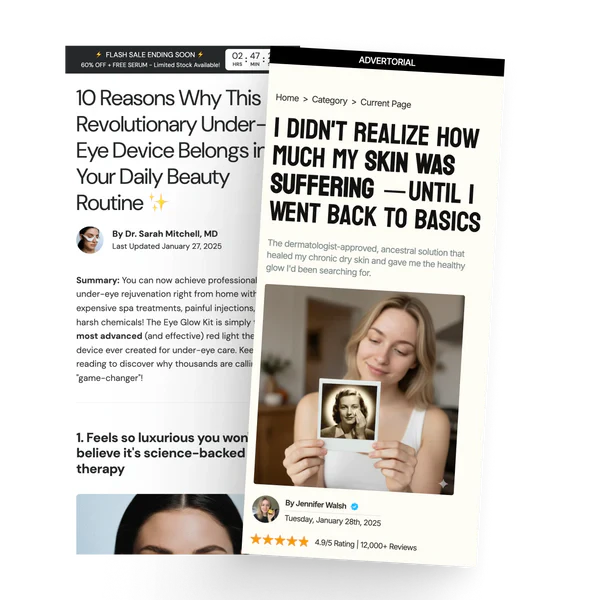 Elixir includes dedicated page templates for **advertorial** and **listicle** style landing pages, the kind of long-form content pages used in paid advertising funnels.
## Advertorial pages
Advertorial pages look like editorial content (blog posts, news articles, reviews) but are designed to sell. To create one:
1. In Shopify admin, go to **Online Store → Pages**.
2. Create a new page.
3. Under **Template**, select **Advertorial**.
4. Open the page in the theme editor to add blocks.
### Available blocks
| Block | What it does |
| ------------------ | ---------------------------------------------------------------------- |
| **Heading** | Article headline |
| **Author** | Author name, photo, and date |
| **Text** | Rich text paragraphs |
| **Image / Video** | Media content |
| **Button** | Call-to-action button |
| **Review** | Individual customer review |
| **Rating** | Star rating display |
| **Amazon Reviews** | Amazon-style review block |
| **Banner** | Promotional banner within the content |
| **Sidebar** | Sticky sidebar with featured product, rating summary, and feature list |
## Listicle pages
Listicle pages present content as a numbered list (e.g. "10 Reasons Why..."). To create one:
1. In Shopify admin, go to **Online Store → Pages**.
2. Create a new page.
3. Under **Template**, select **Listicle**.
4. Open the page in the theme editor to add blocks.
### Available blocks
| Block | What it does |
| --------------------------- | --------------------------------------------- |
| **Listicle header** | Page title and intro |
| **Listicle item** | Standard numbered entry |
| **Listicle item highlight** | Featured entry with emphasis styling |
| **Summary** | Conclusion block |
| **Sticky add to cart** | Fixed buy bar that follows the user on scroll |
| **Timer** | Countdown timer for urgency |
| **Callout quote** | Pull quote or highlighted callout |
## Hide the header and footer
Ad landing pages convert better without navigation, since every link is a way out of the funnel.
1. Go to **Theme settings → Advertorial and Listicle Setting**.
2. In **Pages without header & footer**, enter the page handle, one per line:
```
advertorial-page
landing-page
special-offer
```
The handle is the last part of the page URL. A page at `yourstore.com/pages/summer-sale` has the handle `summer-sale`.
Those pages then render with no header, no navigation, and no footer, leaving your CTA as the only way forward.
Add a **Breadcrumb** section or a small logo at the top so the page still feels like part of your store. Removing navigation shouldn't mean removing trust.
## Tips
* Use the **sale countdown banner** announcement bar with advertorial pages to add urgency
* Add a **sidebar** block with a featured product to keep the CTA visible as users scroll
* Keep the **sticky add to cart** block enabled so users can buy at any point
Elixir includes dedicated page templates for **advertorial** and **listicle** style landing pages, the kind of long-form content pages used in paid advertising funnels.
## Advertorial pages
Advertorial pages look like editorial content (blog posts, news articles, reviews) but are designed to sell. To create one:
1. In Shopify admin, go to **Online Store → Pages**.
2. Create a new page.
3. Under **Template**, select **Advertorial**.
4. Open the page in the theme editor to add blocks.
### Available blocks
| Block | What it does |
| ------------------ | ---------------------------------------------------------------------- |
| **Heading** | Article headline |
| **Author** | Author name, photo, and date |
| **Text** | Rich text paragraphs |
| **Image / Video** | Media content |
| **Button** | Call-to-action button |
| **Review** | Individual customer review |
| **Rating** | Star rating display |
| **Amazon Reviews** | Amazon-style review block |
| **Banner** | Promotional banner within the content |
| **Sidebar** | Sticky sidebar with featured product, rating summary, and feature list |
## Listicle pages
Listicle pages present content as a numbered list (e.g. "10 Reasons Why..."). To create one:
1. In Shopify admin, go to **Online Store → Pages**.
2. Create a new page.
3. Under **Template**, select **Listicle**.
4. Open the page in the theme editor to add blocks.
### Available blocks
| Block | What it does |
| --------------------------- | --------------------------------------------- |
| **Listicle header** | Page title and intro |
| **Listicle item** | Standard numbered entry |
| **Listicle item highlight** | Featured entry with emphasis styling |
| **Summary** | Conclusion block |
| **Sticky add to cart** | Fixed buy bar that follows the user on scroll |
| **Timer** | Countdown timer for urgency |
| **Callout quote** | Pull quote or highlighted callout |
## Hide the header and footer
Ad landing pages convert better without navigation, since every link is a way out of the funnel.
1. Go to **Theme settings → Advertorial and Listicle Setting**.
2. In **Pages without header & footer**, enter the page handle, one per line:
```
advertorial-page
landing-page
special-offer
```
The handle is the last part of the page URL. A page at `yourstore.com/pages/summer-sale` has the handle `summer-sale`.
Those pages then render with no header, no navigation, and no footer, leaving your CTA as the only way forward.
Add a **Breadcrumb** section or a small logo at the top so the page still feels like part of your store. Removing navigation shouldn't mean removing trust.
## Tips
* Use the **sale countdown banner** announcement bar with advertorial pages to add urgency
* Add a **sidebar** block with a featured product to keep the CTA visible as users scroll
* Keep the **sticky add to cart** block enabled so users can buy at any point